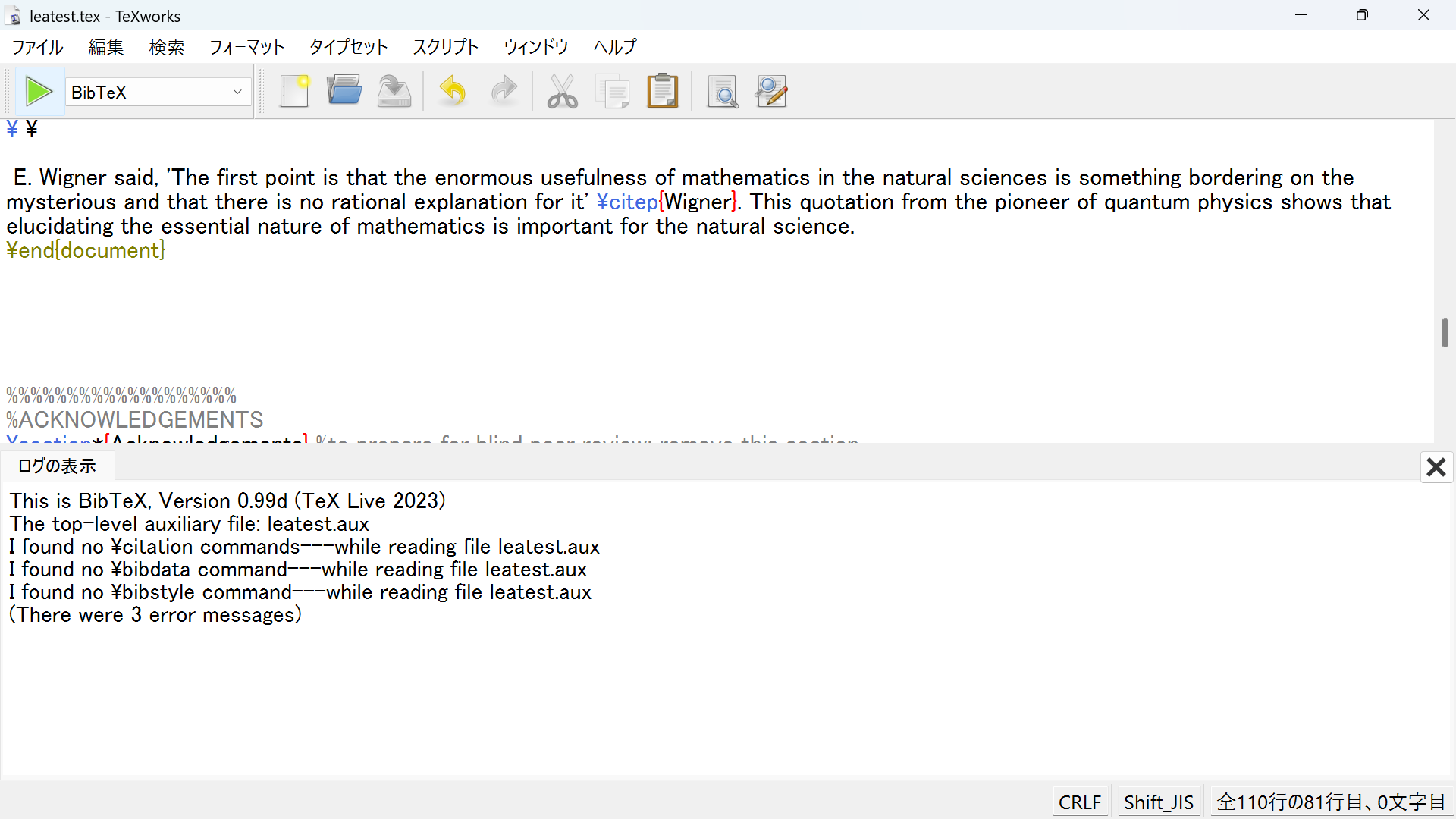
富士通ノートパソコンにWindows11、2023年版のTexを載せて論文を書いています。或る雑誌のLaTeX template に下記のようにデータを入れてコンパイルし、続いてBibtex でコンパイルしたところ、添付のスクリーンショット ss-1 のようなエラーメッセージが出ました。この中に出てくる\citation等のコマンドは美文書作成入門第8版にも載っていません。このエラーにどう対処したらいいかわかりません。templateで指定されているpackage のlea20250909とinf48.bib、logファイル、 およびエラーメッセージに出てくるleatest.aux を添付します。どう対処したらいいかご教示下さい。 植木
%!TEX TS-program = pdflatex
%backend for bibliography = biber
\documentclass[11pt,twoside]{article} %do not change the options
%%%%%%%%%%%%%%%%%%%
%STYLE FYLE OF THE JOURNAL
\usepackage{lea20250909}
%%%%%%%%%%%%%%%%%%%
%%%%%%%%%%%%%%%%%%%
%TITLE, AUTHOR, DATE
\title{The Role of the Infinite in the Development of Mathematics} %insert your title in lowercase letters
\shorttitle{short title} %insert your short title in lowercase letters. if you want to use your title, copypaste it here
\author{\textsc{}}
%to prepare for blind peer review: remove your name
%to prepare for publiation: insert your name. The first letter has to be uppercase, whereas the other letters have to be lowercase.
%\author{\textsc{Firstname1 Lastname1} and \textsc{Firstname1 Lastname2}} in case there are two authors
%\author{\textsc{Firstname1 Lastname1}, \textsc{Firstname1 Lastname2} and \textsc{Firstname3 Lastname3}} in case there are three authors
\date{} %leave empty
%%%%%%%%%%%%%%%%%%%
%%%%%%%%%%%%%%%%%%%
%USER PACKAGES BELOW
%%%%%%%%%%%%%%%%%%%
%%%%%%%%%%%%%%%%%%%
%USER SETTINGS BELOW
%%%%%%%%%%%%%%%%%%%
\theoremstyle{leatheoremstyle} %lea style for theorems, definitions, etc
\newtheorem{thm}{Theorem} %feel free to use your own abbreviations
\newtheorem{defn}{Definition} %feel free to use your own abbreviations
%feel free to add your own environments using the \newtheorem command
%%%%%%%%%%%%%%%%%%
\bibliography{inf48} %insert name of your bibliography file
\begin{document}
%%%%%%%%%%%%%%%%%%%
%TITLE, AUTHOR, ABSTRACT, KEYWORDS
\thispagestyle{empty} %style for the first page
\maketitle
\begin{abstract} %insert abstract
The following hypothesis is proposed, 'In mathematics, contradictions involved in the development of human knowledge are represented with the infinite'. Then the author describes a history of mathematical physics on the base of the hypothesis, and he concludes, 'The contradiction in mathematical description of motion was represented with the infinite within recursive (computable) set level, by early Newtonian mechanics. The contradiction to describe discontinuous phenomena with continuous functions was represented with the infinite higher than the recursive set level, namely with the infinite of arithmetical set level in second order arithmetic (ordinary mathematics), by mechanics of continuous bodies. The contradiction about ``ether'' was represented also with the infinite of arithmetical set level. Contradictions appeared in macroscopic physics applied to microscopic phenomena were represented with the further higher infinite in third or higher order arithmetic (set-theoretic mathematics), by quantum mechanics'. The hypothesis is supported by studies in the higher infinite.
%leave whitespace between the text and the keywords
\begin{keywords}
infinity\sep contradiction\sep history\sep mathematical physics\sep dialectic\sep reverse mathematics
%replace by your own keywords and delete \ldots
\end{keywords}
\end{abstract}
%%%%%%%%%%%%%%%%%%%
%%%%%%%%%%%%%%%%%%%
%MAIN TEXT
\section{Introduction}
\ \
'Philosophy of science without history of science is empty; history of science without philosophy of science is blind' \citep{Lakatos}.
\ \
E. Wigner said, 'The first point is that the enormous usefulness of mathematics in the natural sciences is something bordering on the mysterious and that there is no rational explanation for it' \citep{Wigner}. This quotation from the pioneer of quantum physics shows that elucidating the essential nature of mathematics is important for the natural science.
\end{document}
%%%%%%%%%%%%%%%%%%%
%ACKNOWLEDGEMENTS
\section*{Acknowledgements} %to prepare for blind peer review: remove this section
%to prepare for publication add this section
%%%%%%%%%%%%%%%%%%%
%%%%%%%%%%%%%%%%%%%
%BIBLIOGRAPHY
\printbibliography %backend for bibliography = biber
%%%%%%%%%%%%%%%%%%%
%%%%%%%%%%%%%%%%%%%
%% AUTHOR INFO %%%%
%%%%%%%%%%%%%%%%%%%
\begin{flushright}
Ichiro \textsc{Ueki}\\ %insert your last name in lowercase letters but the first letter should be a capital letter
Member of The History of Mathematics Society of Japan, Member of The Tokushima Society for The History of Science, Japan\\
Email: \href{mailto:ueki1@snow.ocn.ne.jp}{ueki1@snow.ocn.ne.jp}\\
ORCID iD: \href{http://orcid.org/0000-0002-1550-5314}{0000-0002-1550-5314} %remove if you don't have an orcid id
\vspace{.7cm}
Ichiro \textsc{ueki}\\ %insert your last name in lowercase letters
Member of The History of Mathematics Society of Japan, Member of The Tokushima Society for The History of Science, Japan\\
Email: \href{mailto:ueki1@snow.ocn.ne.jp}{ueki1@snow.ocn.ne.jp}\\
ORCID iD: \href{http://orcid.org/0000-0002-1550-5314} %remove if you don't have an orcid id
\end{flushright}
]